
How to reduce jitter on LinuxCNC?
linuxcnc, jitter, hardware ·You know, jitter is a key metric for CNC controller. The lower the jitter, the smoother the machine will operate. However, this is not always obvious how to lower it to achieve something less than 50k. Especially under a full load. Here are some tips with rough estimation of its impact.
Important: jitter/latency and the system performance are opposite things. Less latency you have - slower/laggy system will be.
Kernel compilation is a good example: on regular kernel with jitter ~20M+ it takes 1.5 hours, on PREEMPT_FULL with isolcpus
and other tweaks - more than 3 hours. Same for overall UI: with low jitter system feels a way more laggy and freezy.
1. Use PREEMPT-RT kernel
This is the most obvious thing. Main point: do not mix up built in PREEMPT kernel modes like PREEMPT_VOLUNTARY/PREEMPT/PREEMPT_RT
with PREEMPT_FULL which is a part of PREEMPT-RT patch.
Use only PREEMPT_FULL if you want to achieve the lowest jitter.
Some jitter comparisons (for my particular hardware):
- No PREEMPT: ~8-16M (yes, millions)
- PREEMPT_FULL: 70-100k (out of the box)
- PREEMPT_FULL + isolcpus: 30-50k
- PREEMPT_FULL + isolcpus + disabled devices: 25-35k
- PREEMPT_FULL + isolcpus + disabled devices + BIOS tweaks: under 30k
As you see, even out of the box RT kernel is ok for indirect machine control. For example, together with Mesa board usage. With more tweaks it might be suitable even for a direct control of stepper motors.
Jitter vs network latency
Important: for Mesa-like installation jitter is not the main metric. Network latency is more important.
Usually, jitter related with the latency, but not always. Sometimes need to tweak network driver and related parts.
See r8168-dkms package for details.
To measure network latency do the following check
sudo chrt 99 ping -i .001 -q 10.10.10.10 -c 50000
Look at maximum latency value. It should be measurable less than 1ms for a correct work of Mesa board. For me it’s ~300us. However, if the PC has a big uptime it does weird things and max ping jumps to ~10ms. Restart helps. But the root cause is unknown.
2. Isolate CPU cores
This is a well known technique. The idea is to isolate some CPU cores from the general scheduler. Then LinuxCNC will use only those isolated cores. Other processes will not be scheduled on them.
To do it need to edit /etc/default/grub and add isolcpus= parameter to GRUB_CMDLINE_LINUX_DEFAULT. For example, to isolate cores 2 and 3:
GRUB_CMDLINE_LINUX_DEFAULT="quiet splash isolcpus=2,3"
Then update grub configuration:
sudo update-grub
In some cases rcu_nocbs=2,3 and mitigations=off parameters might help too.
As was mentioned earlier, isolating CPU cores might reduce jitter to 30-50k, i.e. twice.
3. Disable unused hardware
This is a good practice in general. The less hardware you have - the less interrupts you will get. For my installation I disabled Bluetooth and audio/sound.
Bluetooth disabling is easy:
sudo systemctl stop bluetooth.target
sudo systemctl disable bluetooth.target
Sound is more tricky because need to blacklist sound modules. First of all, select all sound modules:
lsmod | grep snd_
or prepare it to blacklist in one command:
lsmod | grep snd_ | awk '{print "blacklist " $1}'
Then create sudo vim /etc/modprobe.d/disable-sound.conf file and add there all found modules. In my case these are following:
blacklist snd
blacklist snd_hda_intel
blacklist snd_hda_codec_hdmi
blacklist snd_hda_codec_realtek
blacklist snd_hda_codec_generic
blacklist snd_hda_core
blacklist snd_hwdep
blacklist snd_hda_codec_hdmi
blacklist snd_sof_pci
blacklist snd_sof_xtensa_dsp
blacklist snd_sof
blacklist snd_sof_utils
blacklist snd_soc_hdac_hda
blacklist snd_hda_ext_core
blacklist snd_soc_acpi_intel_match
blacklist snd_soc_acpi
blacklist snd_intel_dspcfg
blacklist snd_intel_sdw_acpi
blacklist snd_hda_codec
blacklist snd_hda_core
blacklist snd_hwdep
blacklist snd_pcm
Plus
systemctl --user stop pulseaudio.socket
systemctl --user stop pulseaudio.service
systemctl --user disable pulseaudio.socket
systemctl --user disable pulseaudio.service
Feel free to disable anything which you don’t expect to use.
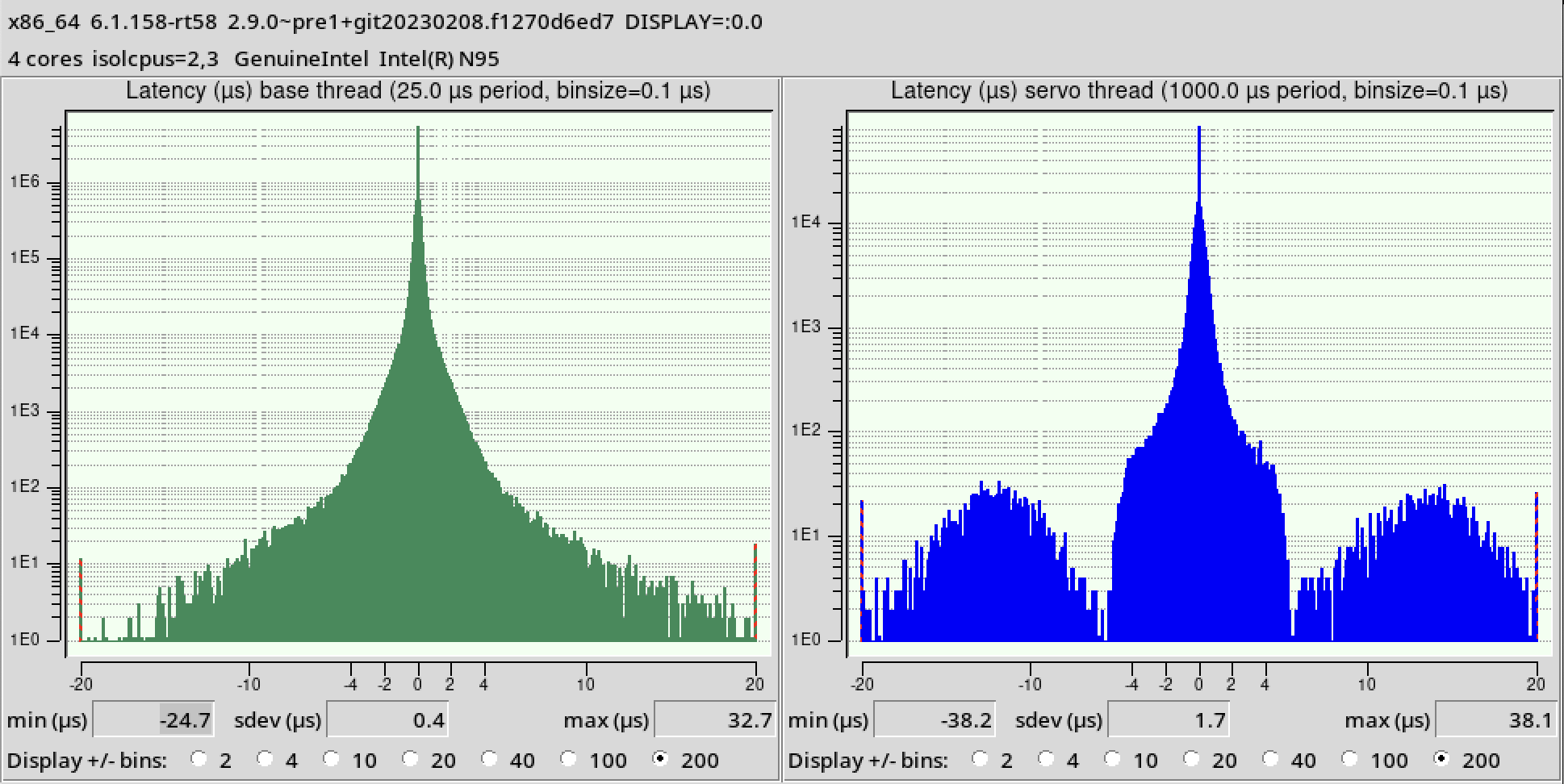
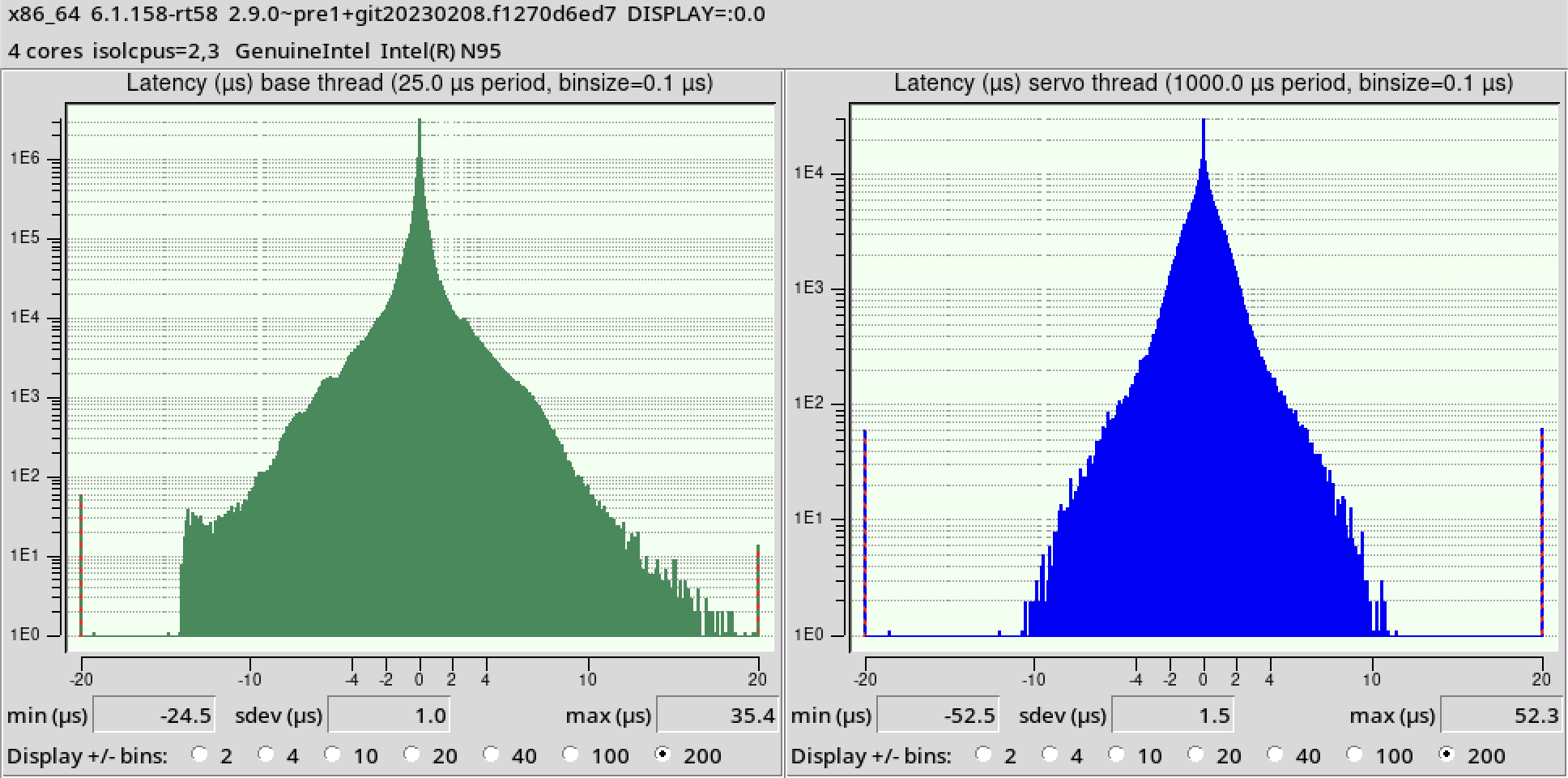
For me, the devices disabling didn’t impact jitter a lot. Around 5-10k reduction. But it measurable reduces dispersion of jitter. The histogram becomes more narrow.
4. BIOS tweaks
Power management is a good thing for laptops. But for CNC controller it’s better to have everything running at full speed all the time. So, disable CPU frequency scaling and other power management features.
In my case I disabled anything in Power Management section of BIOS. All fancy Intel technologies like SpeedStep, C-States, TurboBoost, P-states, etc.
Also, virtualization features is impacting the jitter and should be disabled too.
Finally, feel free to disable any devices in BIOS which you don’t expect to use.
I did that changes as a last step and didn’t notice any major jitter changes. Maybe around ~1k. But it measurably helps with dispersion reduction.
Histogram of jitter before BIOS tweaks:
And after:
5. Other tweaks
Mostly, these are kernel parameters. See section 2 for details about where to add them.
intel_idle.max_cstate=1to disable deep C-states on Intel CPUs. Only BIOS tweaks might be not enough.i915.enable_rc6=0to disable power saving on Intel integrated graphics.mitigations=offas was mentioned before to disable CPU vulnerabilities mitigations which impacts performance and latency.usbcore.autosuspend=-1to disable USB autosuspend.nohz_full=to disable periodic timer ticks on isolated cores. Requires to rebuild kernel withCONFIG_NO_HZ_FULL=yoption. Didn’t test it yet.
I checked all except the last one. It does minor impact on form of jitter histogram. Moreover, the impact depends on the hardware. Need to check each parameter manually to see if it works for the target system.
Also, there are notes/rumors about a system time sync. Each sync leads to a jitter spike (didn’t see it personally). Therefore, etter to disable the sync:
sudo systemctl stop systemd-timesyncd
sudo systemctl disable systemd-timesyncd
or
sudo timedatectl set-ntp false
Finally, there are lots of magic around IRQ affinity settings to handle realtime NIC on the isolated CPUs. Didn’t check it yet as well. However, this might help to lower a network latency for Mesa boards.